Endacopia Mobile Port
A downloadable game for Android
GAME NOT MADE BY ME! ALL CREDITS GO TO ANDYLAND!
ANDROID ONLY!!
\/\/ INSTALLATION TUTORIAL DOWN BELOW \/\/
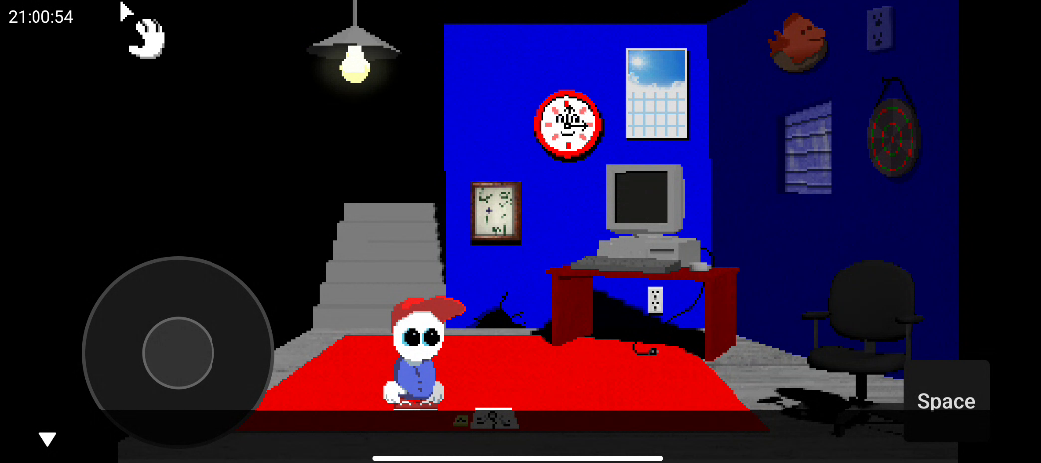
Hello! This is a mobile "port" for endacopia i made
All you need is a copy of endacopia and, well... a phone
No, you will not recieve the game with this, buy it
Demo should work too i didnt test it lol
INSTALLATION:
1: take ALL your endacopia files from steam (right click the game from the bar on the left, then press manage then browse local files) and then place them inside a folder in your phone
2: download AGS player from here:https://github.com/adventuregamestudio/ags/releases/download/v3.6.1.22/AGS-3.6.1...
3:select the folder where you placed the game files (not the game folders themselves) inside the AGS app
4: press the 3 dots in either endacopia/data, endacopia/windows, or the top right of the screen (doesnt matter which one, but if for example you edited the endacopia/windows settings, they will apply ONLY to that folder) then press preference. go to the controls sections and change touch to mouse emulation to two finger. you can also choose the other ones, but bossfights will be IMPOSSIBLE to play, since you cant defend and you also cant use fullscreen
5:download the apk included in here
6:change your current keyboard to "joystick"
7: choose the version where you changed the touch to mouse emulation (if you changed it using the top right preferences page then you can choose both)
8:open the app pause menu (pressing back button) and select "toggle keyboard"
then you're done!
if you need to type in game, just change back your keyboard to your normal one
Download
Install instructions
1: take ALL your endacopia files from steam (right click the game from the bar on the left, then press manage then browse local files) and then place them inside a folder in your phone
2: download AGS player from here:https://github.com/adventuregamestudio/ags/releases/download/v3.6.1.22/AGS-3.6.1...
3:select the folder where you placed the game files (not the game folders themselves) inside the AGS app
4: press the 3 dots in either endacopia/data, endacopia/windows, or the top right of the screen (doesnt matter which one, but if for example you edited the endacopia/windows settings, they will apply ONLY to that folder) then press preference. go to the controls sections and change touch to mouse emulation to two finger. you can also choose the other ones, but bossfights will be IMPOSSIBLE to play, since you cant defend and you also cant use fullscreen
5:download the apk included in here
6:change your current keyboard to "joystick"
7: choose the version where you changed the touch to mouse emulation (if you changed it using the top right preferences page then you can choose both)
8:open the app pause menu (pressing back button) and select "toggle keyboard"
then you're done!
if you need to type in game, just change back your keyboard to your normal one
Comments
Log in with itch.io to leave a comment.
This is why I love itch.io C: